
What if the slowest part of a machine isn’t the PLC logic at all? A delayed response may come from hardware limits, communications, or process conditions. Changing a legacy program without evidence can add risk without fixing the problem. Optimizing PLC logic for efficiency starts with finding the real bottleneck, not simply trying to make code run faster.
It’s understandable to approach changes cautiously. Production downtime is costly, and unclear or poorly documented logic can be difficult to maintain. A disciplined method helps reduce uncertainty. This guide explains how to establish a performance baseline, identify targeted improvements, and check results while preserving safe operation and future maintainability.
You’ll learn which measures to examine, including scan time, memory use, and network load, and how modular logic and data handling can support clearer, more efficient execution. We’ll also cover controlled testing, validation, and documentation so changes are assessed before they affect production. For facilities considering broader control-system changes, PLC and SCADA integration may be relevant when the project scope warrants it.
Key Takeaways
- Define PLC efficiency through reliable control, clear logic, and appropriate resource use, not scan time alone.
- Build a baseline by recording operating conditions, controller diagnostics, and relevant events before changing a production program.
- Choose targeted logic improvements that reduce unnecessary work while preserving sequence intent, fault handling, and operator-visible behaviour.
- Set acceptance criteria in advance and validate changes in an appropriate offline, simulation, or controlled commissioning environment when available.
- Use baseline evidence to determine whether optimizing PLC logic for efficiency is enough or whether recurring bottlenecks call for broader PLC and SCADA integration.
What does optimizing PLC logic for efficiency actually mean?
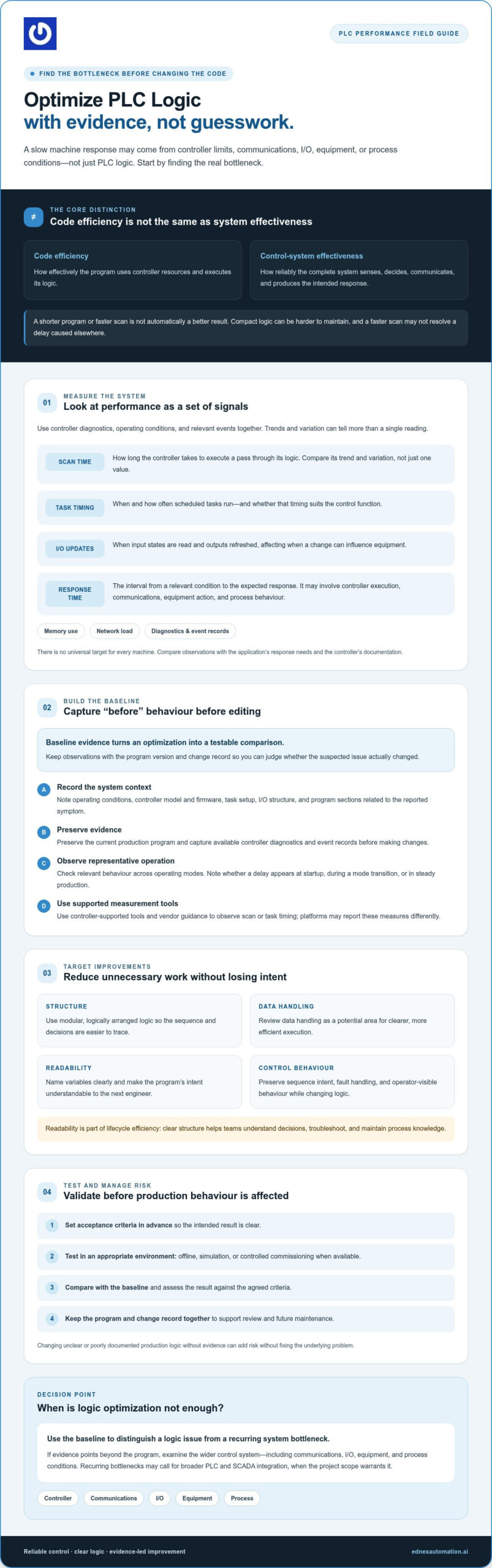
Optimizing PLC logic for efficiency means achieving dependable control with execution, code structure, and controller resources suited to the process. The goal isn’t simply to shorten a program or reduce its scan time. A compact expression may be harder to understand, while a faster scan may have no practical value if a sensor, network, actuator, or process step is causing the delay.
Code efficiency is how effectively the program uses controller resources; control-system effectiveness is how reliably the complete system senses conditions, makes decisions, communicates, and produces the intended process response. Keeping those ideas distinct helps prevent logic changes from being treated as a fix for every performance issue. A Programmable Logic Controller (PLC) runs control instructions and interacts with connected inputs and outputs, but the result also depends on the wider equipment and process.
Which PLC efficiency measures matter in real operations?
Look at several measures together rather than treating one number as proof of performance:
- Scan time: How long the controller takes to execute a pass through its logic. Trends and variation can be more informative than a single reading.
- Task execution: When and how often scheduled program tasks run, and whether their timing suits the control function.
- I/O update behaviour: When the controller reads input states and refreshes outputs. This affects when changes can influence the equipment.
- Response time: The interval between a relevant condition and the expected system response. It may include controller execution, communications, equipment action, and process behaviour.
There’s no universal target that fits every machine. Compare observations with the application’s response needs and the controller’s documentation. Stable response can support process consistency, while useful diagnostics and event records help teams distinguish a logic issue from an I/O, communication, or equipment problem. That distinction matters for troubleshooting and production continuity.
Why readable logic can be more efficient over its lifecycle
Compact code can look efficient but hide intent, especially in a legacy program with inconsistent names or structure. Clearly named variables and logically arranged sections make it easier to trace a sequence, understand fault handling, and see how a change may affect operator-visible behaviour. That clarity can reduce troubleshooting effort without promising a specific time saving.
Maintainability is part of operational efficiency. Engineers who inherit a program need to understand its decisions before making controlled changes. Consistent structure and documentation support clearer handovers and help preserve process knowledge as equipment and teams evolve. Optimizing PLC logic for efficiency means improving execution where evidence supports it while keeping the program understandable over time.
How to establish a PLC performance baseline before changing logic
Before optimizing PLC logic for efficiency, capture how the control system behaves in normal operation. A baseline gives you a reference for judging whether a change addressed the suspected problem or simply shifted it. It also reduces guesswork when a slow response could involve the controller, communications, I/O, equipment, or the process itself.
Baseline data turns an optimization change into a testable comparison: it shows what the system did before the edit and whether its behaviour changed afterward. Follow a consistent sequence and keep the evidence with the program version and change record.
Record controller, task, and process behaviour
Start by documenting operating conditions and system configuration. Record the controller model and firmware, task setup, I/O structure, and program sections related to the reported symptom. Preserve the current production program and capture available diagnostics and event records before editing. Use the controller’s supported tools and vendor guidance to observe scan or task timing. Not every platform reports these measures in the same way.
Collect observations across representative operating modes, not just one convenient snapshot. Note whether a delay appears during startup, a mode transition, or steady production. Pair technical readings with relevant alarms, event timestamps, mode changes, and operator observations. A timing value without process context may show that something changed, but not what triggered it.
Trace the bottleneck before selecting a code change
Compare the timeline from the triggering condition to the expected response. Check whether the evidence points to logic execution, communication delays, I/O update behaviour, equipment response, or process sequencing. Trends and event records can help distinguish a recurring constraint from an isolated anomaly. If a sensor signal arrives late or equipment takes longer to respond, rewriting PLC logic may not address the source.
For a useful comparison, record the same measures under comparable conditions before and after any change. Note the production mode, relevant setpoints, alarms, and known differences in load or sequence. Research from the University of Wollongong discusses using scan time to identify code issues, offering context for testing PLC logic changes. Treat scan-time evidence as one diagnostic input, not a substitute for checking the wider system.
- Document: Record the system configuration, operating conditions, and program version.
- Observe and measure: Capture supported controller diagnostics alongside process events across representative modes.
- Diagnose and record: Trace the symptom to a likely source, preserve the evidence, and define what a successful change should improve.
If the evidence suggests a problem spans control logic and supervisory communication, EdNex Automation’s PLC and SCADA integration offering may be relevant when defining the project scope.
Which PLC logic optimization techniques improve efficiency without adding complexity?
Match each optimization to an observed symptom, then confirm the change preserves the machine’s intended sequence, fault handling, and operator-visible behaviour. Useful improvements often remove avoidable work or make logic easier to understand, rather than rewriting a program to reduce instruction count. Keep the original program and compare the changed version against the baseline under representative operating conditions.
| Technique | Suitable symptom | Potential benefit | What to verify |
|---|---|---|---|
| Targeted refactoring | A difficult-to-follow or duplicated sequence | Clearer logic and easier fault tracing | Sequence transitions, interlocks, and fault responses |
| Remove redundant work | Repeated calculations or conditions that don’t affect the process | Less unnecessary execution and simpler review | Outputs and decisions remain equivalent |
| Review polling and scheduling | Frequent checks or tasks with unsuitable timing | More appropriate use of controller resources | Controller support, response timing, and missed events |
Reduce avoidable work while preserving control behaviour
Look for the same calculation performed in multiple routines, identical conditions evaluated repeatedly, or values updated when no control decision depends on them. Removing duplication can make intent easier to follow, but first confirm that each update’s timing and side effects are understood. A seemingly redundant instruction may support an alarm, interlock, or downstream routine.
Event-driven execution or adjusted task scheduling may suit some applications, but only when the controller supports the approach and the timing remains appropriate for the process. Review data handling and communications too: repeated transfers, excessive polling, or slow device updates can constrain performance even if the main routine is efficient. Don’t shift work between tasks or reduce checks without assessing what could be delayed or missed.
Refactor for clarity, consistency, and future troubleshooting
Use meaningful tag names and consistent program structure so another engineer can trace a condition from input through decision to output. Modular routines can help isolate functions when their boundaries reflect the actual control task. Avoid fragmenting the program so much that readers must jump through layers to understand a straightforward sequence.
Ladder Diagram (LD) may be familiar to teams who troubleshoot through relay-style logic, while Structured Text (ST) can suit some complex calculations or data operations. Choose the language based on the application, maintainers’ skills, and project environment, not fashion. IEC 61131-3:2025 specifies LD, Function Block Diagram, and ST as its main languages; confirm supported features and terminology against the controller and engineering tools in use.
Optimizing PLC logic for efficiency means making a targeted improvement without obscuring sequence intent. Validate changed behaviour, fault handling, and operator indications before treating cleaner or faster code as a better control system.
How to test PLC logic changes and manage optimization risks
Every logic change should have a defined purpose and a way to prove whether it worked. Before editing, set acceptance criteria for process behaviour and relevant performance observations. Specify which sequence must complete as designed, which alarms or interlocks must remain effective, and which timing or diagnostic measures will be compared. This makes optimizing PLC logic for efficiency a controlled engineering activity, not informal code cleanup.
Preserve the original production program, record its version, and document the proposed change and its rationale. Establish a rollback plan before deployment: identify the approved version to restore, who is authorized to do so, and how the process will return to a known safe state under site procedures. Where suitable tools and project conditions allow, test offline or in simulation before introducing changes to operating equipment. Simulation can expose logic issues, but it doesn’t replace validation on the actual system.
Validate normal operation, faults, and edge cases
Test the expected sequence as well as transitions and conditions that could interrupt it. Include relevant alarms, interlocks, recovery behaviour, and abnormal inputs. Confirm that affected I/O, communications, and operator displays still show the right states and messages. Compare post-change observations with the documented baseline under comparable operating conditions, and record any differences, including results that don’t meet acceptance criteria.
Testing should confirm more than a successful normal cycle. Check that faults are detected and handled as intended, recovery doesn’t skip required steps, and operators can still understand the system’s state. Have authorized personnel review the results before approving deployment.
Protect safety and production during deployment
Follow site-specific safety and change-management procedures, including approvals and coordination with personnel responsible for the equipment. Plan the deployment window, communicate the expected operational impact, and confirm who is responsible for monitoring and decision-making. Performance tuning is never authorization to bypass a safety function or weaken a safeguard. Changes that could affect safety require the appropriate review process.
After deployment, monitor the agreed criteria and document the final program version, test results, approvals, and follow-up actions. If the change causes unexpected behaviour or fails its acceptance criteria, use the rollback plan rather than making unreviewed edits under production pressure. For connected control environments, review SCADA security best practices alongside change controls so operational changes are considered within the broader system context.
When logic changes intersect with supervisory systems, EdNex Automation’s PLC and SCADA integration offering may be relevant to the project scope.
When PLC logic optimization calls for broader integration support
A recurring delay may not originate in the PLC routine. If the same symptom persists after a documented logic change, or appears alongside delayed SCADA updates, communication interruptions, equipment response issues, or process-sequence constraints, investigate the full control path. PLC and SCADA coordination can help teams compare controller events with supervisory displays and process data, supporting system-level diagnosis without guaranteeing a particular result.
A broader assessment may be appropriate when symptoms cross system boundaries, documentation is incomplete, or a change could affect connected equipment and production operations. Background on PLC and SCADA integration services can help frame the questions to resolve. A scan-time concern alone, however, doesn’t prove that new hardware or external support is needed.
Decide whether to optimize in-house or engage an integration partner
Assess whether your team can investigate and validate the issue. Consider whether internal specialists understand the controller and connected systems, whether current drawings and program records are reliable, and whether authorized staff have the system access needed to gather evidence. Weigh those factors against the production risk of testing a change on live equipment.
Before work begins, agree who owns design review, test planning, approvals, deployment decisions, documentation, and ongoing support. If internal expertise and records are sufficient, a focused in-house change may be appropriate. If evidence points across PLC logic, SCADA, communications, or equipment interfaces, an integration partner may help define a coordinated scope. EdNex Automation provides PLC and SCADA integration for industrial and commercial clients across the UAE. Confirm that proposed project activities match your requirements.
Prepare a focused brief for the next optimization project
A concise project brief ties technical investigation to operational needs. Include the symptoms and when they occur, baseline measurements, affected assets and interfaces, relevant alarms or event records, and troubleshooting already completed. Note production constraints and the conditions under which testing can be performed.
- Define success: State the process behaviour and performance observations that will indicate an acceptable result.
- Set safeguards: Identify required safety reviews, approvals, test conditions, deployment responsibilities, and rollback expectations.
- Clarify deliverables: Agree how decisions, test results, program versions, and updated documentation will be recorded.
With that evidence, optimizing PLC logic for efficiency becomes a scoped, measurable project rather than an open-ended code rewrite. To explore whether PLC and SCADA integration fits your control-system requirements, discuss PLC and SCADA integration with EdNex Automation.
Turn measured improvements into dependable control
Effective PLC optimization starts with evidence, not assumptions. Establish a baseline across representative operating conditions, then target changes to the bottleneck you’ve identified. A faster scan isn’t a success on its own: the logic must preserve process behaviour, fault handling, and maintainability.
By optimizing PLC logic for efficiency through controlled testing, documented acceptance criteria, and a rollback plan, teams can evaluate improvements without treating production or safety as an afterthought. If recurring issues span controller logic, supervisory systems, or communications, assess the wider control-system scope.
EdNex Automation provides PLC and SCADA integration alongside industrial and commercial automation solutions for clients across the UAE. Discuss your PLC and SCADA integration requirements with EdNex Automation to explore whether integration fits your project needs. With a clear baseline and a disciplined plan, your next improvement can strengthen operational performance and long-term control-system clarity.
Frequently Asked Questions
What does optimizing PLC logic for efficiency mean?
Optimizing PLC logic for efficiency means improving how control logic performs its intended task while keeping operation dependable, understandable, and responsive enough for the application. Shorter code or a lower scan time alone doesn’t prove the system is better. Assess controller execution alongside process behaviour, communications, troubleshooting needs, and applicable safety requirements. Define the desired operational outcome first, then use evidence to determine whether a logic change is appropriate.
How can I reduce PLC scan time safely?
First, confirm that scan time is the measured problem and identify which task or routine contributes to it. Review repeated calculations, polling, or updates, but don’t change logic just to meet an arbitrary target. Test proposed changes against expected sequences and fault conditions, follow site change controls, and retain a rollback option. Consult the controller documentation, since diagnostic methods and performance limits vary by platform.
Can optimizing PLC logic improve production efficiency?
It can improve production performance when control logic is a verified source of delay, instability, or difficult fault recovery. But equipment response, I/O, communications, operating procedures, and upstream or downstream constraints can also affect output. Establish a baseline and connect each proposed change to a measurable operational requirement. Then compare results under similar conditions before attributing any production improvement to the logic change.
What should I check before changing PLC logic?
Document the controller and program configuration, operating modes, symptoms, relevant diagnostics, and current program version. Identify affected equipment, interlocks, alarms, interfaces, and the people responsible for review and approval. Set test conditions and acceptance criteria before editing, and preserve a rollback option. If the program’s behaviour or safety implications aren’t clear, pause and involve the appropriate controls and site-safety specialists rather than experimenting on a running production system.
Is shorter PLC code always more efficient?
No. Shorter code can be harder to review, troubleshoot, or safely modify, and it doesn’t necessarily execute faster. Efficient logic should suit the controller and application while making behaviour clear to the people who maintain it. Evaluate execution measurements, readability, fault handling, and future maintenance needs together. A well-structured program may be a stronger operational choice than a compact implementation that obscures how the machine responds.
When should I use PLC and SCADA integration support?
Consider integration support when investigation points beyond one routine, such as symptoms involving PLC behaviour, SCADA data, communications, equipment interfaces, or wider control architecture. Prepare baseline observations, available system documentation, operational constraints, and acceptance criteria before defining the scope. Clarify responsibility for testing, commissioning, documentation, and ongoing support. EdNex Automation provides PLC and SCADA integration for industrial and commercial clients across the UAE; confirm that the project scope matches your requirements.