A robot label isn’t a procurement specification. If you’re searching for a “b2w robot,” the term often points to the Unitree B2-W, but the name alone doesn’t confirm the manufacturer, model, or capabilities of a system you’re considering. That uncertainty matters: the wrong assumption can lead to an evaluation that misses your operation’s actual needs.
Product information should explain what a robot does and what it needs to work safely alongside your equipment and people. This article shows you how to identify what “B2W” refers to, verify the system with the relevant manufacturer or source, and assess whether the confirmed robot fits your operational requirements in the UAE.
We’ll cover what to check, from the exact model and functions to safety documentation and compatibility with your existing control environment. We’ll also explain when an automation integrator can help assess the fit. EdNex Automation supplies and integrates several robot categories and industrial automation systems across the UAE, making it a potential technical discussion partner once the system and requirements are clear.
Key Takeaways
- Verify what “B2W” means using the original product page, technical document, or manufacturer information before comparing systems.
- For a b2w robot, confirm the manufacturer, exact model, intended use, and specifications instead of relying on an unclear label.
- Evaluate the verified robot against the task, work environment, safety documentation, and existing control systems.
- Use a capability-and-evidence comparison to separate confirmed details from questions that still need answers.
- EdNex Automation’s portfolio doesn’t identify a B2W-named product, but its robotics and integration experience may support a discussion about a verified use case.
What Does “B2W Robot” Mean? Verify the Term Before Comparing Systems
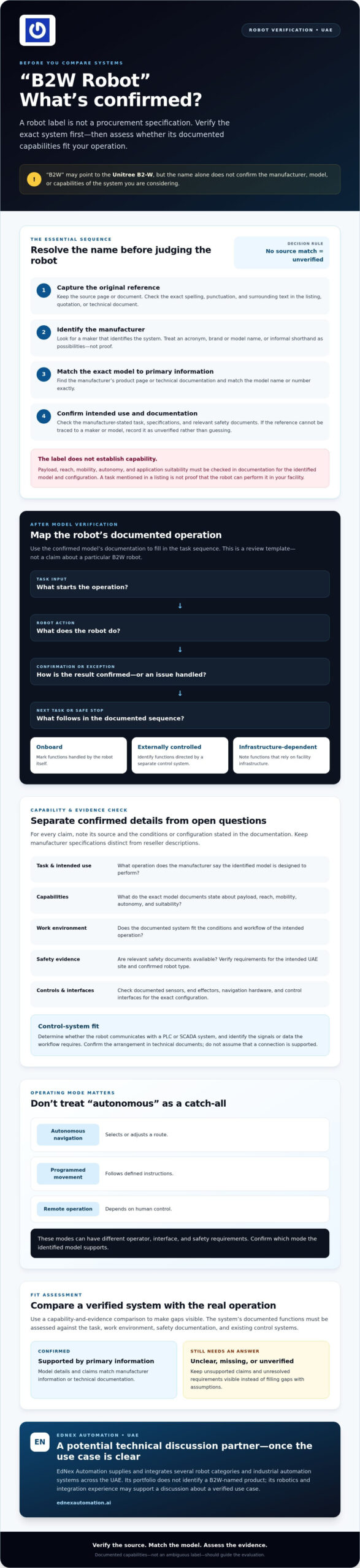
“B2W robot” doesn’t establish a single, verified product or robot category. Treat it as an unresolved term until you can trace it to a specific source. It could be an acronym, brand or model name, or informal shorthand used in a listing or discussion. Each possibility calls for different evidence, and none can be confirmed from the letters alone.
Check the source where you encountered the term, then match its claims to a manufacturer’s product page or technical documentation. If the source describes a mobile industrial system, the Mobile industrial robots overview offers general category context. It can’t verify what “B2W” means or identify a particular machine.
How Can You Confirm What B2W Refers To?
Start with the exact spelling, punctuation, and surrounding text in the original product listing, quotation, or technical document. Look for a manufacturer and model identifier, then find the manufacturer’s official page or documentation. Match the model number exactly to that primary information before relying on product claims. If you can’t trace the reference to a maker or model, record it as unverified rather than guessing.
Quick verification check
- Source: Where did the term appear? Keep the original page or document.
- Maker: Does a manufacturer identify the system?
- Model: Can the exact model name or number be matched to primary information?
- Intended task: What operation does the manufacturer say the robot is designed to perform?
- Documentation: Are specifications and relevant safety documents available for review?
Why the Name Alone Cannot Establish a Robot’s Capabilities
A label doesn’t confirm payload, reach, mobility, autonomy, or suitability for an application. Check those details in documentation for the identified model, and note the stated conditions and configuration. Separate manufacturer specifications from reseller descriptions, and flag claims that lack a clear source. A task described in a listing isn’t proof that a robot can perform it in your facility.
The verified documentation, not an ambiguous label, establishes a robot’s documented capabilities. Until the name, maker, and model align with a primary source, comparisons risk weighing assumptions rather than systems. Once you verify the product, assess it against your task and operating environment.
How to Understand a B2W Robot’s Operation and Technical Requirements
Review how the robot operates only after verifying its category and model. Don’t infer what “B2W” stands for or how the system works from its name. Use the manufacturer’s documentation to map the task cycle: what the robot does, what triggers each step, and where a person or another system must intervene.
A simple process diagram can help expose gaps:
Task input → Robot action → Confirmation or exception → Next task or safe stop
Use this as a template, not as a claim about a particular b2w robot. Fill in each step using the confirmed system’s documented sequence. Then mark each function as onboard, externally controlled, or dependent on facility infrastructure. For example, the manufacturer may document onboard sensing while a separate control system issues task commands. Confirm the arrangement in the technical documents.
Autonomous navigation selects or adjusts a route, programmed movement follows defined instructions, and remote operation depends on human control. These modes can have different operator, interface, and safety requirements. Check which mode the model supports rather than treating “autonomous” as a catch-all.
Which System Components and Interfaces Should You Check?
Check components documented for the exact configuration, such as sensors, end effectors, navigation hardware, and control interfaces. Find out whether the robot communicates with a PLC or SCADA system, and identify the signals or data the workflow requires. If control-system connectivity is relevant, review PLC and SCADA integration services for context on assessing that interface. For safety background, consult OSHA’s Robotics safety standards, then verify the requirements applicable to the intended UAE site and confirmed robot type.
What Operating Conditions Can Change Performance?
Compare documented operating limits with actual site conditions before selecting a system. Review floor surfaces and transitions, aisle dimensions, obstacles, environmental conditions, and expected interactions with people or other equipment. Ask the manufacturer which limits have been tested and under what configuration. A site assessment may still be needed to check clearances, traffic patterns, connectivity, and workflow assumptions.
Avoid relying on generic claims about speed, uptime, payload, or accuracy. These depend on the identified model, configuration, and operating conditions. Request relevant evidence and note unanswered questions. Once you’ve documented the task and interface requirements, discussing a verified automation use case with an integrator can help assess how it fits your existing control environment.
How to Assess a B2W Robot Against Other Automation Options
After verifying the system and its intended task, compare it with alternatives against the same workflow. A label such as “robot,” “AMR,” or “cobot” doesn’t make systems interchangeable. Define the job first: what needs to move or be done, where it happens, how people interact with the system, and what payload and control interfaces the task requires. Then compare documented capabilities with those operating needs.
Use a comparison table to distinguish evidence from assumptions. The entries below are prompts, not claims about a particular b2w robot. Fill them with information from the confirmed model’s documentation and your site requirements. Mark anything missing as unverified.
| Verified capability | Operational requirement | Evidence source | Open question |
|---|---|---|---|
| Task or function the manufacturer documents | Required job, cycle, and expected outcome | Manufacturer product page or technical document | Does it perform the full task or only one step? |
| Mobility and navigation, if applicable | Route, floor, aisle, and interaction conditions | Model-specific specifications and operating guidance | Have the actual route and conditions been assessed? |
| Payload or end-effector capability, if applicable | Load, handling method, and task constraints | Documented configuration and capability limits | Are limits confirmed for the proposed configuration? |
| Control mode and available interfaces | Autonomy, operator involvement, and system connectivity | Manufacturer interface and safety documentation | What integration or support is needed at the site? |
When Is an AMR or Cobot a Relevant Comparison?
Compare an AMR if the verified task involves autonomous movement of materials. The autonomous mobile robots guide can help frame that category. A cobot is relevant when the task involves collaborative robotic work at a station. If the verified use case doesn’t match either function, don’t force the comparison. Consider alternatives that address the same workflow.
Which Evidence Makes a Comparison Useful?
Use manufacturer specifications and documented application requirements, not unverified seller claims. Compare safety documents, system interfaces, operating constraints, and the support scope required for each option. Tie evidence to the exact model and configuration. If payload, environmental limits, or integration details aren’t available, mark them as unknown and request confirmation rather than relying on typical industry assumptions.
A disciplined comparison turns a broad search into a procurement decision: which verified system can meet the defined task under the site’s conditions, and what still needs validation before selection?
What to Verify Before Evaluating or Procuring a B2W Robot
Base procurement decisions on a documented process, not an unclear product label. Use this checklist to move from the task to a site-fit decision. Keep confirmed facts separate from unanswered questions, and don’t treat missing information as evidence that the system meets a requirement.
- Define the task. Record the job, starting conditions, handoffs, expected outcome, and exceptions the system must handle.
- Verify the source and category. Trace the “B2W” reference to its original product page, technical document, or manufacturer, then confirm what kind of robot is being proposed.
- Confirm manufacturer, model, and intended use. Match the exact model identifier to a primary source and check that the documented use aligns with your task.
- Check relevant specifications. Request model- and configuration-specific evidence for capabilities that matter to the job, such as payload, movement, operating limits, or interfaces.
- Review safety documentation. Ask for documents relevant to the confirmed robot and intended operating environment. Record questions that need review by a qualified technical professional.
- Map integration and facility needs. Separate equipment requirements from possible facility changes and control-system connections, including PLC, SCADA, warehouse, or other operational interfaces.
- Clarify people and support requirements. Identify operator training needs, and ask the supplier to define responsibilities for integration, commissioning, maintenance, and escalation.
- Document the site-fit decision. Compare verified capabilities with task, site, safety, and interface requirements. List unresolved items and state whether the system is suitable, unsuitable, or requires further validation.
Which Questions Should You Ask the Manufacturer or Supplier?
Request primary-source documentation for each capability tied to the proposed application. Ask which configuration the evidence covers, what assumptions or exclusions affect performance, and which site conditions could change the result. Clarify who is responsible for integration and commissioning, what support is included, and how maintenance and escalation are handled. Record responses in writing so you can check supplier statements against the documents.
How Do You Check Fit With Existing Operations?
Map the current process before proposing automation. Movement paths, handoffs, traffic, operator interactions, and exception cases all shape the real requirement. Identify each system the robot must exchange information with, then list required interfaces separately from facility changes and robot specifications. Leave unresolved safety or compliance questions open for qualified review rather than assuming they’re covered.
Once you’ve verified the b2w robot reference and requirements, a technical discussion can help assess the use case against your operation. Discuss your verified robotics use case with EdNex Automation, which supplies and integrates robotics and industrial automation systems for commercial and industrial clients across the UAE.
How EdNex Automation Can Help Assess a Verified Robot Use Case
EdNex Automation’s portfolio includes several robot categories and industrial automation systems, but it doesn’t identify a product named “B2W.” An integrator should assess the verified system against your operational requirements, not infer a product or promise a fit from an ambiguous term.
After confirming the manufacturer, model, and intended task, an integration discussion can help clarify how the proposed system relates to your workflow and existing control environment. EdNex Automation supplies and integrates robotics and industrial automation systems for commercial and industrial clients across the UAE. Depending on the verified use case, relevant portfolio categories may include autonomous mobile robots, collaborative robots, inspection robots, or PLC and SCADA integration. These are starting points for technical assessment, not claims that a category is suitable for a particular B2W reference.
What Information Should You Bring to an Initial Discussion?
Bring the product evidence and operating context together so the assessment starts with facts:
- The original reference to the b2w robot, including its product page or technical document.
- The manufacturer, exact model number, intended use, and any available specifications or safety documentation.
- A clear description of the process, handoffs, operating environment, and expected throughput.
- Details of existing control systems, such as PLC or SCADA, and other systems the workflow may need to connect with.
- Known constraints, open safety questions, and the project outcomes you need the automation to support.
Separate confirmed details from supplier statements that still need evidence. If documentation is incomplete, identify what you need before evaluating the proposed system responsibly.
How Can Integration Expertise Reduce Uncertainty?
An integrator can help assess whether the verified robot category aligns with the task, how it interacts with surrounding equipment, and which control or operational dependencies need attention before equipment selection. That review may reveal facility conditions, interfaces, or workflow exceptions that product specifications alone don’t address. It can also help distinguish the robot’s documented requirements from changes the site may need to consider.
The outcome should be clearer requirements and a list of unresolved questions, not an assumed endorsement. If you’ve verified the reference and gathered the relevant documents, discuss your verified robotics use case with EdNex Automation to explore how it relates to your operation and existing automation environment.
Make Your Next Robotics Decision Evidence-Led
A productive evaluation starts by confirming what “B2W” refers to, then matching the verified manufacturer, model, and documented capabilities to a real operational task. Don’t let an ambiguous b2w robot label substitute for evidence. Compare options against the same workflow, and account for safety documentation, site conditions, control interfaces, and operator needs before deciding whether a system fits.
Where integration is part of the decision, EdNex Automation supplies and integrates robotics for commercial and industrial clients across the UAE. Its portfolio includes several robot categories, along with PLC and SCADA integration. This can support a technical discussion about your verified application, but suitability depends on the system, requirements, and operating environment.
Bring the original product reference, available documentation, and a clear description of your process to discuss your verified robotics use case with EdNex Automation. A defined site-fit assessment can help you identify what is established and what still needs checking.
Frequently Asked Questions
What does “B2W robot” mean?
“B2W robot” doesn’t have a single verified meaning here. It could be a product label, model name, acronym, or shorthand used in a particular source. Check the original listing or document, then compare its wording with the manufacturer’s official information. Don’t infer the robot’s category, intended task, or capabilities from the term alone. If the source is unclear, ask the supplier to clarify it.
Is B2W a robot brand or a type of robot?
It isn’t clear whether B2W is a brand, model name, or robot category. Look for the manufacturer, exact model identifier, and official product documentation to determine how the term is used. If a listing mentions B2W without those details, request clarification before comparing specifications or treating it as a defined technology. Brand and category claims should be traceable to a primary source.
How can I identify the manufacturer of a B2W robot?
Start with the exact product page, quotation, label, or technical document where you saw the term. Look for a manufacturer name and model number, then check both against documentation published by the manufacturer. If the information appears only in a reseller listing, request primary-source specifications and confirmation that the model reference is correct. This helps avoid evaluating a product based on an incomplete or mistaken listing.
Can a B2W robot integrate with PLC or SCADA systems?
That depends on the verified robot model, its control interfaces, and your facility’s existing architecture. Check technical documentation for supported protocols and integration requirements, then have qualified specialists assess the specific environment. Don’t assume compatibility from the b2w robot label alone. Clarify who is responsible for configuration, commissioning, testing, and ongoing support, and identify interfaces or site dependencies that need attention.
What should I check before buying a B2W robot?
Verify the manufacturer, exact model, intended application, documented capabilities, safety materials, and support arrangements. Compare these details with the task, operating environment, existing systems, and deployment constraints. Ask the supplier to identify assumptions and exclusions in its proposal. If specifications or documents are missing, list them as unresolved questions rather than treating them as confirmed features. Make a site-fit decision only after reviewing the evidence.
How do I know whether a B2W robot is right for my operation?
Define the task and the outcome your operation needs, then confirm what the B2W reference identifies. Compare the verified system’s capabilities and constraints with your workflow, environment, safety requirements, and integration needs. Consider how people, equipment, and existing control systems interact with the proposed robot. If the product identity or operating assumptions remain unclear, seek a technical assessment before making a procurement decision.