
A successful automation pilot is a starting point, not the finish line. Scaling automation as your business grows helps your operation handle rising workloads without relying on manual processes at every stage. The value comes from expanding proven workflows deliberately, with clear goals, quality controls and support for the people who use them.
Caution is sensible: a pilot can show what works in one area, while wider deployment introduces new dependencies, risks and communication needs. But confining automation to isolated trials can limit its impact, leaving repetitive work and process bottlenecks in place as the business expands.
This article explains why moving beyond pilots can make sense, how to scale while managing risk and keeping teams aligned, and what broader deployment can deliver. It also covers why process readiness matters, how to assess performance against business goals, and how growing businesses in the UAE can treat automation as a connected part of their operations.
Key Takeaways
- Map workflows and pinpoint bottlenecks before expanding automation, so technology improves a sound process rather than accelerating inefficiency.
- Manage expansion with clear ownership, employee training, security controls and communication that explains how roles and workflows will change.
- Extending proven automation can help teams handle growing workloads, respond to changing demand and redirect effort toward higher-value work.
- Choose tools by matching their integration, security and scalability to the task’s complexity, your resources and your operational goals.
Beyond Pilots: Why Scale Automation?
Scaling automation as your business grows means extending proven workflows beyond isolated pilots and aligning deployments with operational goals. It matters when manual handoffs begin to constrain growth, even after a successful trial.
Assessing Processes and Bottlenecks
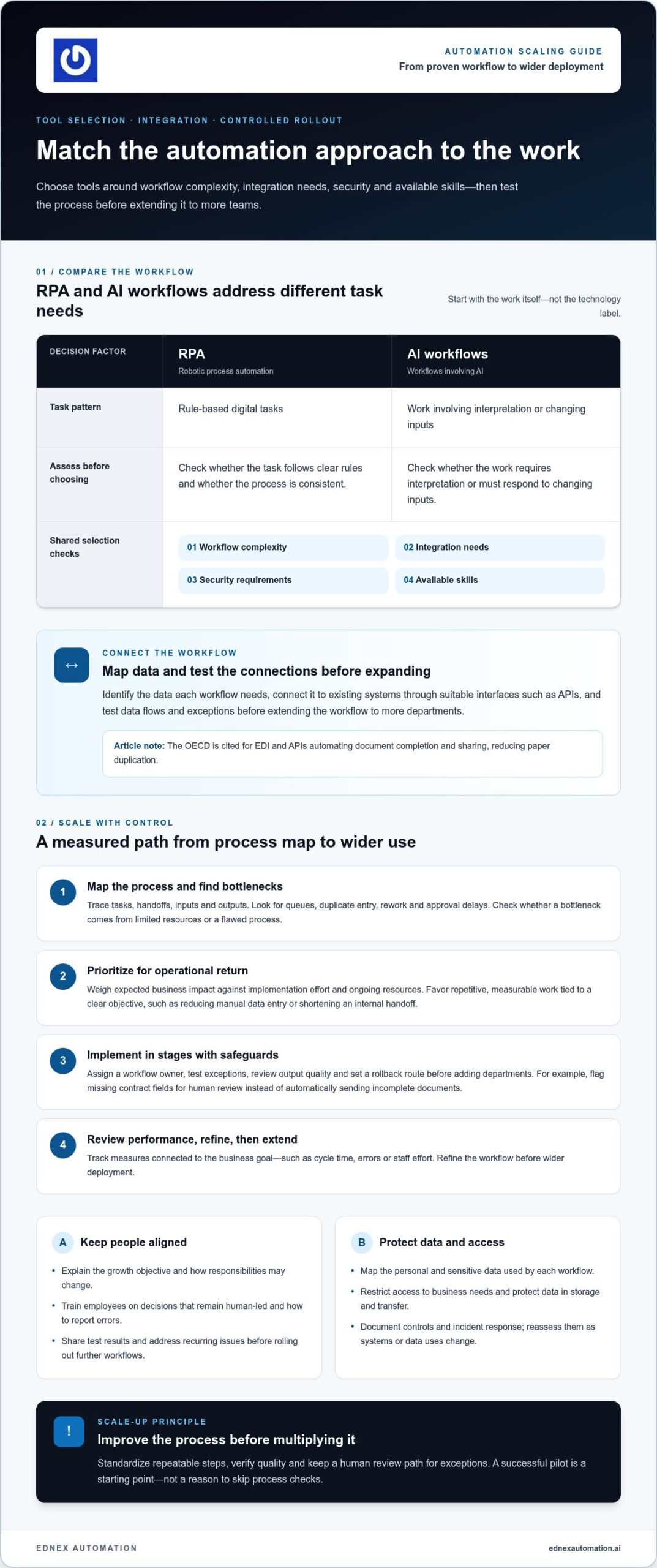
Map tasks, handoffs, inputs and outputs to see where work stalls. Compare demand with available people, system capacity and skills; identify queues, duplicate entry, rework and approval delays. Determine whether each bottleneck reflects limited resources or a flawed process, since automation can accelerate existing inefficiencies. Standardise repeatable steps across departments before scaling so teams follow consistent rules and produce reliable outputs.
Prioritizing Process Optimization by ROI
Prioritise processes by weighing expected business impact against implementation effort and ongoing resources. Start with workflows that are repetitive, measurable and tied to a clear objective, such as reducing manual data entry or shortening an internal handoff. Compare the current process with the optimised version, including staff time, error correction and maintenance needs. This directs effort toward work with a credible operational return, rather than automating a task simply because it is easy to automate.
Selecting and Integrating Automation Tools
Choose tools based on workflow complexity, integration needs, security and available skills. Robotic process automation can handle rule-based digital tasks, while AI workflows can support work involving interpretation or changing inputs. To connect tools with existing systems, map the data each workflow needs, then use suitable interfaces such as APIs. According to the OECD, EDI and APIs can automate document completion and sharing, reducing paper duplication. Test data flows and exceptions before extending the workflow to more departments.
Scaling Automation and Specialist Support
A successful scale-up moves from process mapping to prioritisation, controlled implementation, performance review and wider deployment. Track measures tied to the business goal, such as cycle time, errors or staff effort, then refine workflows before extending them. Bring in automation specialists or consultants when integration spans multiple systems, AI or RPA workflows require complex configuration, or internal teams lack the expertise to manage architecture and exceptions. Their technical input can help align implementation with existing systems and operational requirements.
Risk management and communication during scaling
Scaling automation too quickly can spread a process failure across teams before controls catch it. Expand in stages: assign a workflow owner, test exceptions, review output quality and set a rollback route before adding departments. For example, a contract workflow should flag missing fields for human review rather than automatically sending incomplete documents. This approach helps teams improve performance without sacrificing quality as workloads rise.
Contract management platforms can centralise creation, negotiation, collaboration, compliance tracking and reporting. Before automating contract creation, assign access by role and define approval points, version control and escalation paths. A legal or procurement team can review templates and exceptions while routine tasks move through the platform. Train employees so they understand which decisions remain human-led and how to report errors.
In the UAE, keeping automation secure and aligned with data-protection requirements starts with mapping the personal and sensitive data each workflow uses. Restrict access to business needs, protect data in storage and transfer, and review how platforms handle information across connected systems. Document the workflow, its controls and the incident response process, then reassess them as systems or data uses change. These practical steps support compliance without assuming one control suits every operation.
Change management needs clear communication, not just a launch announcement. Leaders should explain the growth objective, how each team’s responsibilities may change, and where employees can raise concerns. Share test results and address recurring issues before rolling out further workflows. For warehouse operations, teams extending automated storage can explore Automated Storage and Retrieval Systems as one relevant application. Aligning staff, controls, and implementation stages helps automation scale efficiently while protecting service quality.
Benefits of scaling automation beyond pilots
Once a pilot proves reliable, extending automation across connected workflows helps a business process more work. Automated systems can handle rising volumes without requiring a proportional increase in labour. For example, a repeatable document workflow can serve several teams instead of remaining limited to one trial group. This creates a scalable operating model, allowing people to focus on exceptions, customer needs and decisions that require human judgement.
Broader deployment also increases the value of reusable components. Teams can adapt a tested workflow or template for related tasks, reducing redevelopment and helping new automation go live faster. A finance team, for example, might reuse an established approval sequence for similar document types. Standard components make expansion more consistent, while clear ownership helps teams maintain them as business demands change.
AI can extend these gains where workflows require interpretation or flexible responses. Accenture research reports 3.3× better scalability outcomes for AI-driven companies. That figure describes a reported outcome, not a guaranteed result for every implementation. The practical benefit is the ability to support more activity through connected systems, while employees handle complex cases and improve the service around them.
Automation can also help an enterprise respond faster when customer demand or operating conditions shift. A business that streamlines order processing, for instance, can adjust connected workflows as request patterns change. Reusable automation makes those adjustments easier to apply across departments. Teams can then direct effort toward emerging priorities instead of repeating manual steps in each location or business unit.
To capture these benefits, expand from proven use cases and track the operational outcome each one supports. Compare workload handled, cycle time, error patterns and employee effort before and after deployment. These measures show whether automation is strengthening capacity or creating new friction. Extending successful workflows in stages gives growing businesses a practical route from isolated pilots to integrated operations.
What are the best automation tools for small and growing businesses?
The right fit depends on the task, existing systems and the capabilities your team can maintain. For a growing UAE business, a cloud-based workflow tool may coordinate approvals across teams, while robotic process automation can handle repetitive, rule-based digital tasks. AI-powered tools can suit workflows that involve interpreting information. Match the technology to the work rather than choosing tools because they are trending.
No-code platforms let business users build or adjust workflows through visual interfaces, supporting faster changes without traditional development. Low-code tools allow more technical customisation, while conventional software development can suit more complex requirements. These approaches are not interchangeable. A simple internal request process may fit no-code, while a workflow with specialised integrations may require technical development.
For repetitive activities, robotic process automation can transfer information between systems or follow defined steps. AI-powered tools can support tasks involving variable inputs, such as sorting incoming requests for review. Keep a person involved when decisions need context or exceptions require judgement. This division helps teams automate routine work while preserving oversight in less predictable cases.
Compare potential tools using four practical criteria: ease of use, scalability, integration capabilities and security. Then map each tool against the workflow’s inputs, outputs, users and exception paths. A platform that works well for one department may not integrate effectively with another team’s systems. Test a representative workflow and assess whether staff can operate it, maintain access controls and adapt it as requirements change.
Small businesses should also consider available skills and ongoing operational effort. A tool that requires extensive customization can create maintenance demands that outweigh its value for a straightforward task. Choose an option that fits both current needs and planned growth, then review performance before expanding its use. Explore automation solutions for growing operations to consider how automation may support your business.
EdNex Automation: Collaborative Robots (Cobots)
EdNex Automation offers Collaborative Robots (Cobots) for businesses exploring how robotics can support operational growth. Cobots may suit a repeatable task that limits throughput and is appropriate for collaborative automation. Before deployment, define the task, its inputs and outputs, and how people currently interact with the process.
Different operational demands call for different technologies. Autonomous Mobile Robots (AMRs) can support mobile workflows, while cleaning robots and delivery robots address other routine operational tasks. Matching a solution to a clearly defined need helps businesses assess where robotics could fit into wider automation plans.
For UAE businesses ready to explore collaborative robotics, EdNex Automation can discuss its cobot offering alongside other relevant robotic solutions. Contact EdNex Automation to discuss your automation requirements.
Build the Next Stage of Operational Capability
Long-term competitiveness depends on making automation part of how the business adapts, rather than treating each deployment as a standalone project. Scaling automation as your business grows means setting a direction for how people, processes and technology will work together as operational demands evolve. The next opportunity may be another workflow, department or facility, guided by clear business priorities.
For physical operations, the right technology depends on the task. EdNex Automation offers Collaborative Robots (Cobots), Autonomous Mobile Robots (AMRs) and cleaning robots for businesses exploring robotic automation across different operational needs. Start by identifying where a defined task fits your growth plans, then consider how a suitable solution could integrate into the wider operation.
When you’re ready to explore a practical next step for your business, contact EdNex Automation. Build deliberately, and give your next stage of growth a stronger operational foundation.
Frequently Asked Questions
What does scaling a business mean?
Scaling a business means increasing its capacity to serve more customers or handle greater demand without costs and resources rising at the same rate. For example, a company may increase order volumes by improving fulfilment processes rather than adding manual steps for every new order. Growth means getting bigger; scaling means building operating capacity that can support that growth sustainably.
How do you scale business automation as a company grows?
Scale business automation by extending reliable workflows to other teams, sites or related tasks. For example, after validating an invoice approval workflow, a company could adapt its controls for purchase approvals. Assign an owner to each workflow, define how exceptions are handled and review whether performance remains consistent after expansion. Add integrations or capacity as operational requirements change.
Which business processes should be automated first when scaling?
Start with processes that occur frequently, follow consistent rules and create a visible operational constraint. A growing distributor, for instance, might assess repetitive order-entry tasks if delays are affecting fulfilment. Do not choose a process solely because it seems easy to automate. Consider the impact of errors, the number of handoffs and whether the process has clear inputs and outputs.
How do you calculate the ROI of business automation?
Compare the value automation creates with its total implementation and operating costs over a defined review period. Include measurable effects such as staff time redirected, fewer corrections, reduced delays and ongoing software or maintenance expenses. For example, track processing time and rework before and after deployment. Use the same measurement method in both periods, and distinguish verified savings from projected benefits.
What are the risks of automating business processes too quickly?
Rapid automation can spread incorrect decisions, inconsistent data or process failures across more operations before teams detect them. A workflow built around outdated approval rules, for example, may route every request incorrectly once expanded. Fast rollouts can also leave employees without clear guidance or support. Test unusual cases, assign an accountable owner and monitor output quality before extending automation further.